 Walid Karray
This post assumes you have working knowledge of AWS Lambda and Serverless Framework.
06 APR 2022 — AWS announced an exciting news of Built-in HTTPS Endpoints for Lambda functions. You can read the original post .
Before this announcement, to expose an HTTP endpoint with a custom domain for your lambda backend you have to use the following AWS resources:
- Lambda (application backend)
- API Gateway (to expose HTTP endpoint)
- Cloudfront distribution
- Route 53
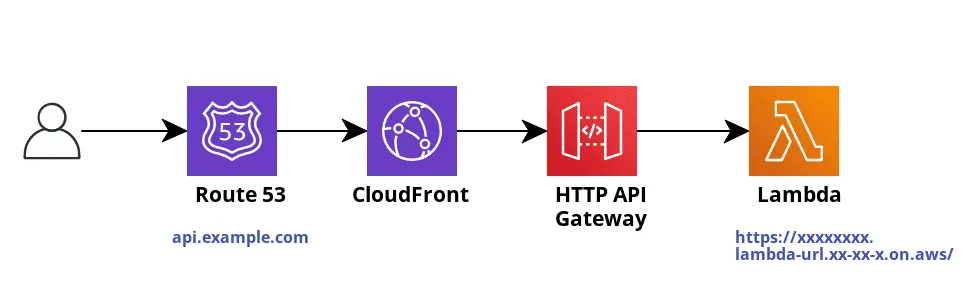
Custom domain API endpoint architecture without Lambda Function URLs
Fortunately, with AWS Lambda URLs you no longer need the API Gateway !
This is how it looks the new architecture :
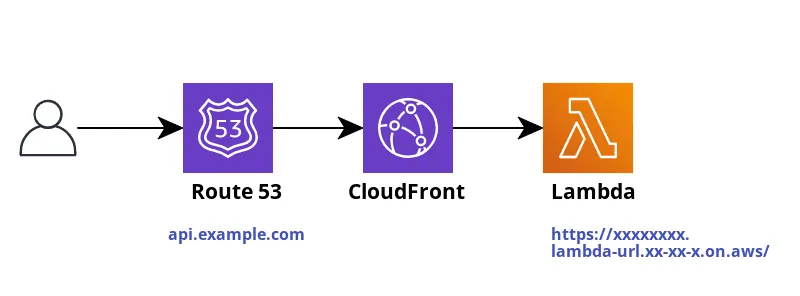
Custom domain API endpoint architecture with Lambda Function URLs
Let’s deep dive into the subject …
In this section, we will create and deploy a “Hello World” HTTP endpoint with a custom domain using Lambda Function URLs !
Note: In this tutorial I have used Javascript for Lambda handler and Serverless framework as IaC.
As a first step, you need to install serverless framework.
$ mkdir lambda-function-url-custom-domain
$ cd ./lambda-function-url-custom-domain
$ yarn add -D serverlessCreate a serverless.yaml file with the following content :
service: lambda-function-url-custom-domain
frameworkVersion: '3'

provider:
  name: aws
  runtime: nodejs14.x
  region: ${opt:region, 'eu-west-1'}
  lambdaHashingVersion: '20201221'

custom:
  apiDomain: api.example.com  # change by your custom domain
  hostedZoneName: example.com.  # your domain Route 53 hosted zone name
  certificateNVirginaArn: arn:aws:acm:us-east-1:xxxxxx:certificate/xxxxxxx # change by your certificate ARN (should be in North Virginia region)

functions:
  api:
    handler: lambda.handler
    url: true # needed to expose lambda function url !

resources:
  Resources:
    ApiCloudFrontDistribution:
      Type: AWS::CloudFront::Distribution
      DeletionPolicy: Delete
      Properties:
        DistributionConfig:
          Enabled: true
          PriceClass: PriceClass_100
          HttpVersion: http2
          Comment: Api distribution for ${self:custom.apiDomain}
          Origins:
            - Id: ApiGateway
              DomainName: !Select [2, !Split ["/", !GetAtt ApiLambdaFunctionUrl.FunctionUrl]] # extract function url form your lambda resource
              OriginPath: ''
              CustomOriginConfig:
                HTTPPort: 80
                HTTPSPort: 443
                OriginProtocolPolicy: https-only
                OriginSSLProtocols: [TLSv1, TLSv1.1, TLSv1.2]
          DefaultCacheBehavior:
            TargetOriginId: ApiGateway
            ViewerProtocolPolicy: redirect-to-https
            Compress: true
            DefaultTTL: 0
            AllowedMethods:
              - HEAD
              - DELETE
              - POST
              - GET
              - OPTIONS
              - PUT
              - PATCH
            CachedMethods:
              - HEAD
              - OPTIONS
              - GET
            ForwardedValues:
              QueryString: false
              Headers:
                - Accept
                - x-api-key
                - Authorization
              Cookies:
                Forward: none
          Aliases:
            - ${self:custom.apiDomain}
          ViewerCertificate:
            SslSupportMethod: sni-only
            MinimumProtocolVersion: TLSv1.2_2019
            AcmCertificateArn: ${self:custom.certificateNVirginaArn}
    ApiRecordSetGroup:
      Type: AWS::Route53::RecordSetGroup
      DeletionPolicy: Delete
      DependsOn:
        - ApiCloudFrontDistribution
      Properties:
        HostedZoneName: ${self:custom.hostedZoneName}
        RecordSets:
          - Name: ${self:custom.apiDomain}
            Type: A
            AliasTarget:
              HostedZoneId: Z2FDTNDATAQYW2 # Cloudfront default hosted zone ID
              DNSName: { 'Fn::GetAtt': [ApiCloudFrontDistribution, DomainName] } # set the domain of your cloudfront distribution
First of all you need to configure parameters in the custom section :
- apiDomain: a custom domain for your backend/api endpoint
- hostedZoneName: Route 53 hosted zone name of your domain name (please note that a hosted zone name should ends with a “.”)
- certificateNVirginiaArn: Certificate ARN to use with CloudFront, it should be created only in US East (N. Virginia) region.
As you can see we have the following 3 resources :
- A Lambda function: You should note that once the resource is created AWS will attribute a random url it looks like this : https://oydnwyle2uxj7rtkmro4234qca0otptu.lambda-url.eu-west-1.on.aws/
- A Cloudfront distribution ApiCloudFrontDistribution which handles all incoming traffic to the origin “your Lambda function URL endpoint” .
In order to set the Cloudfront Origin domain name by the generated Lambda function url domain, you need to use this CloudFormation syntax :
!Select [2, !Split [“/”, !GetAtt ApiLambdaFunctionUrl.FunctionUrl]] # extract function url form your lambda resourceIn our project, the name of the lambda function is “api” so the Lambda resource name should be “ApiLambdaFunctionUrl”. If for instance your function name is “backend” It will be “BackendLambdaFunctionUrl”.
- A Route 53 RecordSetGroup ApiRecordSetGroup to setup an alias “A” record “api.example.com” that routes traffic to our Cloudfront Distribution
Next, we need to create our Lambda function that returns the following message ‘Hello from Lambda Function URLs !’ with a 200 (OK) as HTTP status code.
lambda.js
exports.handler = async (event) => {
    return {
        statusCode: 200,
        body: 'Hello from Lambda Function URLs !',
    };
};
The final step is to deploy
$ sls deployAs you can see, when deployment finished, the function URL will be displayed in console output. Note that is the random attributed Lambda URL endpoint.
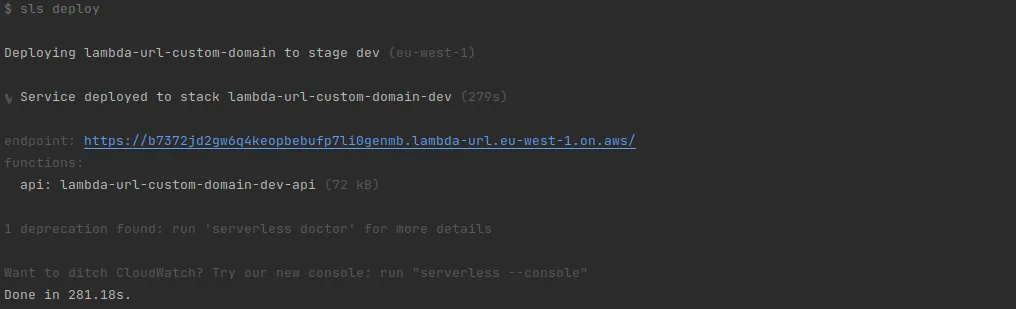
But don’t worry ! Everything should be fine with your custom endpoint.
Juste copy-paste your custom endpoint in a web browser and you should get response displayed from your lambda handler like shown below.
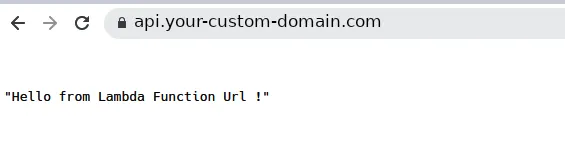
If it didn’t work and you got and error like DNS_PROBE_FINISHED_NXDOMAIN, wait a while and check again, it’s due to DNS propagation delay.
Conclusion
So in this way you are able to deploy a serverless application with a custom domain using only Lambda + Cloudfront + Route 53, thanks to Lambda Function URLs.
The source code of this tutorial can be accessed on GitHub from this link.
You can read more about function URLs from this interesting article : https://lumigo.io/blog/aws-lambda-function-url-is-live/
Thanks for reading!
If you like the above article please clap the same and if you don’t like please put your thoughts in comments so that I can improve it.