You’re a freelancer. You track billable days. You send activity reports to clients. Why does your tooling feel like it was built for a 500-person company?
Most time-tracking apps are designed for teams, managers, and enterprise workflows. They come with seat-based pricing, bloated dashboards, and features you’ll never touch. All you need is a clean monthly report showing which days you worked — and maybe a PDF to attach to your invoice.
That’s exactly what Presto does. Nothing more, nothing less.
What Is Presto?
Presto is an open-source, self-hosted activity report generator. It lets you:
- Track billable days per client and mission on a visual calendar
- Generate professional PDF reports ready to send to clients
- Monitor your revenue and utilization with built-in dashboards
- Run it on your own server with a single Docker command
It’s MIT-licensed, fully self-contained, and takes under 2 minutes to deploy.
The Dashboard: Your Year at a Glance
When you open Presto, the first thing you see is your activity dashboard — a card-based overview of all your reports for the year, grouped by client.
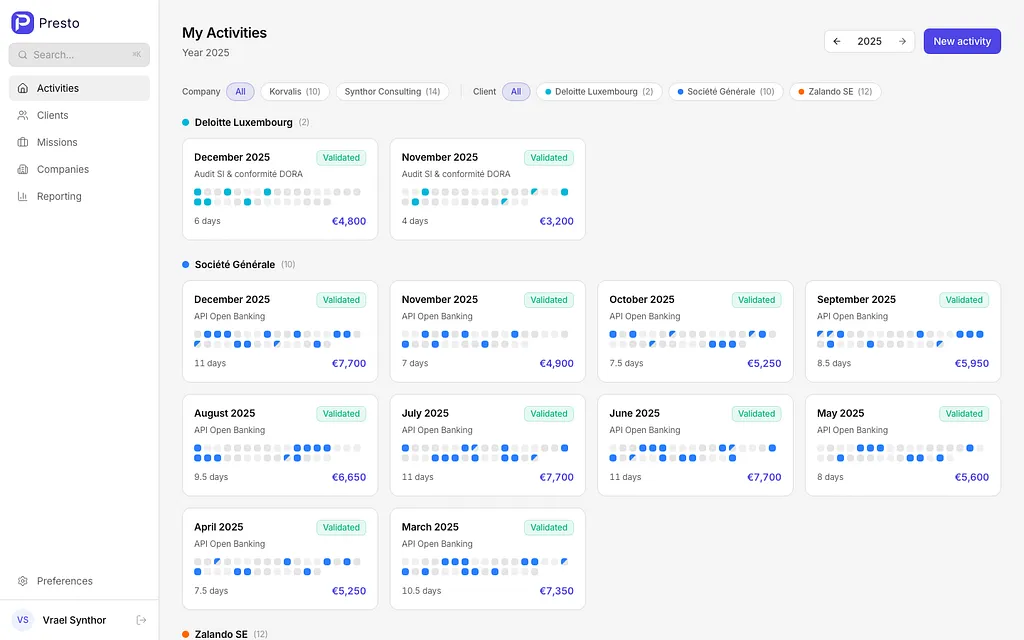
Presto Dashboard — Activity report cards grouped by client, with calendar previews and revenue
Each card shows the month, mission name, a mini calendar preview (so you can visually spot worked days), the number of days billed, and the revenue. Reports are color-coded by client and tagged as Draft or Validated.
You can filter by company or client, navigate between years, and create a new report in two clicks.
No clutter. No Gantt charts. Just your work, organized by month.
The Report Editor: Click, Fill, Done
The heart of Presto is the calendar-based report editor. Each day in the month is a clickable cell — tap once for a full day, tap again for a half day, tap again to clear it. That’s it.
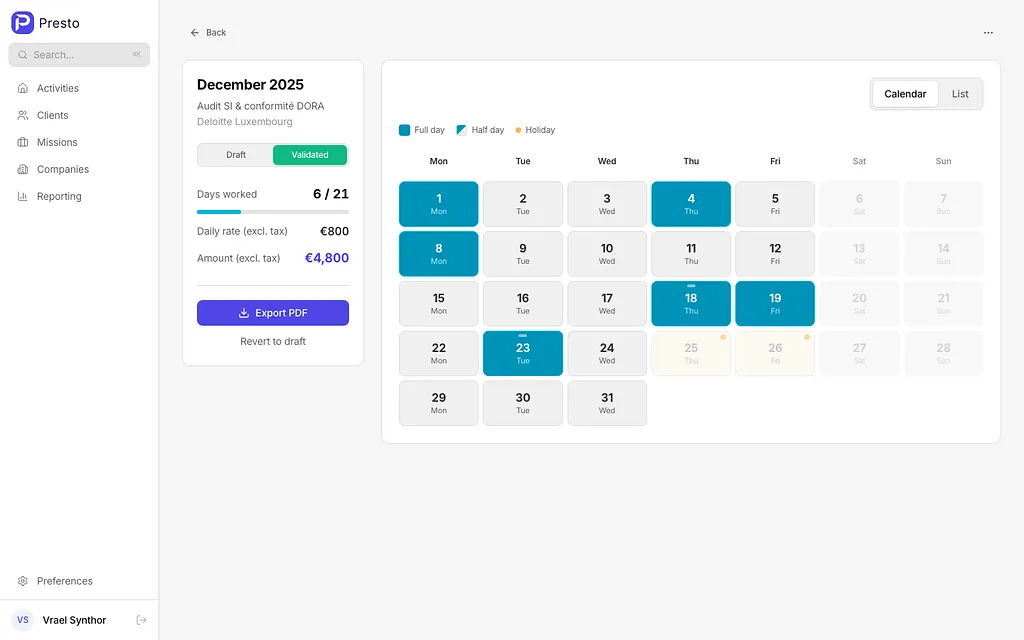
Presto Activity Report Editor — Calendar view with full days, half days, and holiday markers
The side panel shows you a live summary: days worked out of available workdays, your daily rate, and the total amount. When a report is complete, toggle it to Validated and hit Export PDF to generate a print-ready document.
Features that save real time:
- Auto-fill workdays — One click fills every weekday in the month. Weekends and public holidays are automatically skipped.
- Country-specific holidays — Set a holiday country per client (France, Germany, Luxembourg… all countries supported). Holidays appear as yellow dots on the calendar.
- Half-day precision — Because sometimes you only work a morning.
- Notes per day — Add context to specific days (meetings, deliveries, on-site visits).
- Draft / Validated workflow — Validated reports are locked. No accidental edits.
Reporting: Know Your Numbers
The Reporting page gives you a high-level view of your freelance business for the year.
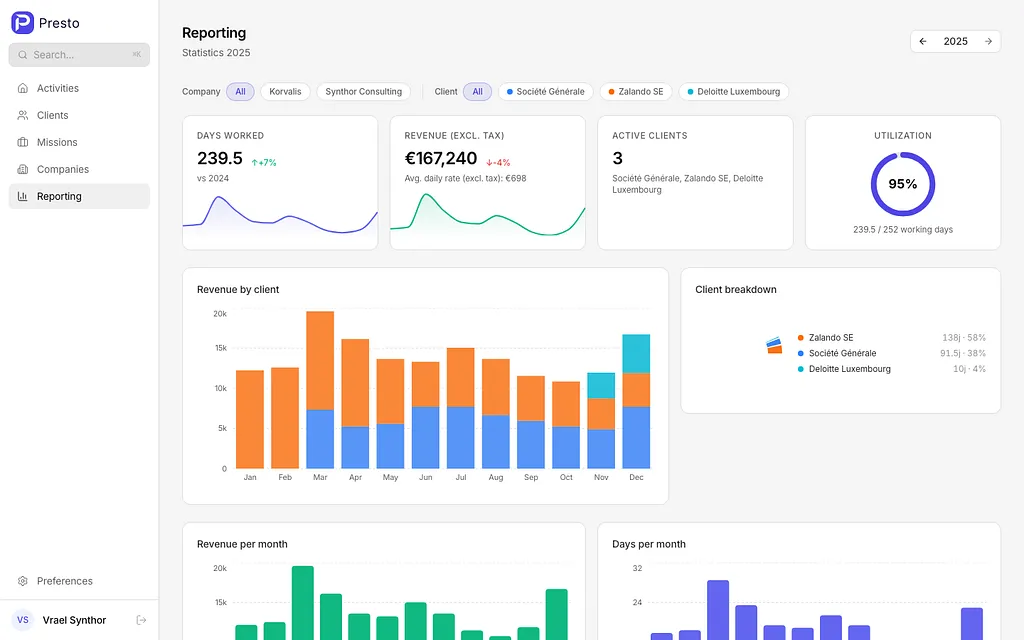
Presto Reporting Dashboard — KPIs, revenue charts, and utilization gauge
Four KPI cards at the top:
- Days Worked — with year-over-year comparison and a sparkline trend
- Revenue — total revenue with automatic multi-currency conversion
- Active Clients — how many clients you billed this year
- Utilization — a gauge showing what percentage of available working days you actually billed
Below that, interactive charts break down revenue by client (stacked bar), client distribution (donut), and monthly trends for both revenue and days.
If you work with clients in different currencies (EUR, USD, GBP…), Presto automatically converts everything to your base currency using live exchange rates. You see one unified number.
PDF Export: Professional Reports in Seconds
When a report is validated, Presto generates a server-side PDF using React PDF. The output includes:
- Your company details and client information
- A clean calendar grid with worked days highlighted
- Totals: days worked, daily rate, total amount
- Notes section
- Available in 5 languages: English, French, German, Spanish, Portuguese
The filename is auto-generated (e.g., Acme_Corp-API_Project-2025-12.pdf). Download, attach to your invoice email, done.
Multi-Client, Multi-Currency, Multi-Language
Presto is built for freelancers who juggle multiple clients across borders:
- Companies — Register your own legal entities (useful if you operate under multiple business names)
- Clients — Each client gets its own currency, holiday country, color, and contact details
- Missions — Each mission (project/contract) has a daily rate and links to a client
- Currencies — All ISO 4217 currencies supported. Revenue dashboards convert automatically.
- Languages — Full UI in English, French, German, Spanish, and Portuguese
Deploy in 60 Seconds
Presto ships as a single Docker image. No microservices, no separate frontend container, no Redis, no message queue. Just the app and PostgreSQL.
# docker-compose.yml
services:
  presto:
    image: axforge/presto:latest
    ports:
      - "8080:8080"
    environment:
      DATABASE_URL: postgresql://presto:secret@db:5432/presto
      JWT_SECRET: your-secret-key-min-32-characters-long
    depends_on:
      - db

  db:
    image: postgres:17-alpine
    environment:
      POSTGRES_USER: presto
      POSTGRES_PASSWORD: secret
      POSTGRES_DB: presto
    volumes:
      - pgdata:/var/lib/postgresql/data

volumes:
  pgdata:
docker compose up -dOpen http://localhost:8080, create an account, and start tracking.
Single-user mode
If you’re the only user, skip authentication entirely:
environment:
  AUTH_DISABLED: "true"
No login screen. No password. Just open the app and go.
Lock it down after setup
Created your account? Disable registration so nobody else can sign up:
environment:
  REGISTRATION_ENABLED: "false"
The Tech Behind It
For the curious:
- Runtime — Bun
- Frontend — React 19, Vite 6, Tailwind CSS 4, Zustand, TanStack Query
- Backend — Hono, Drizzle ORM
- Database — PostgreSQL
- PDF — @react-pdf/renderer (server-side)
- Language — TypeScript 5.7, strict mode
- Tests — 222 API E2E tests
Migrations run automatically at startup. The Docker image is a multi-stage build that produces a lean Alpine-based container.
Who Is Presto For?
Presto is for freelancers and independent consultants who:
- Bill clients by the day (or half-day)
- Need to submit monthly activity reports
- Want to track revenue across multiple clients and currencies
- Prefer self-hosted tools over SaaS subscriptions
- Value simplicity over feature bloat
If you’ve been using spreadsheets, Notion templates, or overpriced time trackers to do what is fundamentally a simple task — Presto is your exit ramp.
Get Started
- GitHub: github.com/tux86/presto
- Docker Hub: hub.docker.com/r/axforge/presto
- License: MIT — free forever, no strings attached
Star the repo if you find it useful. Contributions and feedback are welcome.
Presto is open-source and actively maintained. Built by a freelancer, for freelancers.